Keep your simulated iPhone location running 24/7
An always-on iPhone location spoofer keeps your simulated GPS running around the clock. There are two ways to get there: the PinDrift iPhone app, which needs nothing left running once it is installed, or a desktop host you leave powered. Here is exactly how each one works, and what each one costs you.
Always-on iPhone location spoofing means your simulated GPS keeps running around the clock. PinDrift does it two ways. The simplest is the PinDrift iPhone app, included with every paid plan: your computer installs it once, and after that the phone holds and moves its own location with nothing else running, no host, no cable, no network. The other way is desktop always-on, which is how it worked before the app existed: leave any spare Windows or Mac machine powered on a shelf and it drives the phone over your network.
What always-on means
Left to itself, an iPhone does not hold a simulated location: a computer feeds it the position you set as a live stream, and stopping the stream drops the phone back to real GPS within seconds. Desktop always-on is simply keeping that stream alive continuously, so the simulation never blinks off.
The PinDrift iPhone app changes that, because it puts the thing generating the position on the phone. There is no stream to keep alive and nothing to stay awake. That is the difference between the two modes, and it is the reason this page is no longer only about keeping a computer powered.
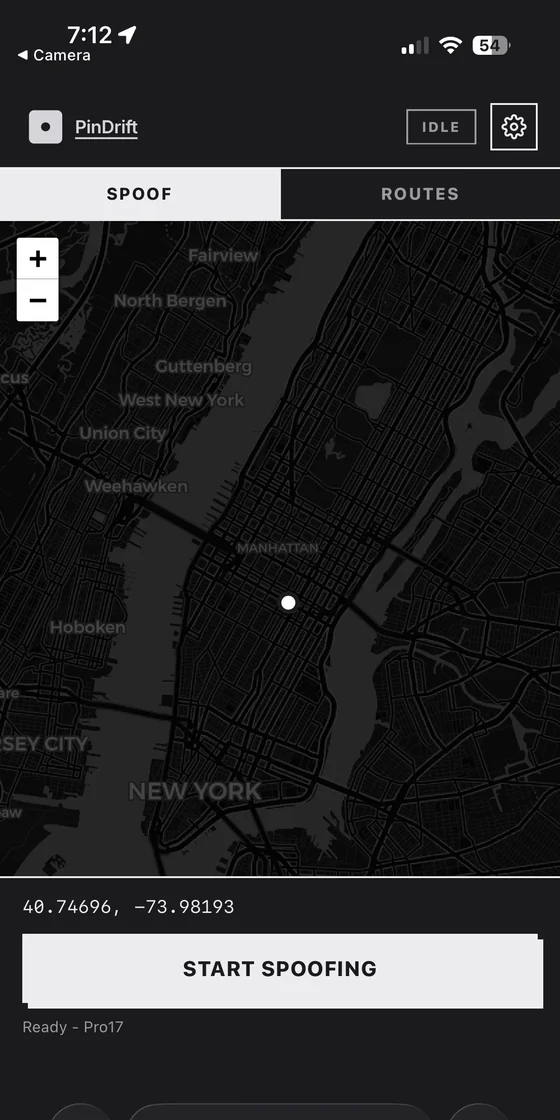
PinDrift's always-on mode is built for exactly this. You install it on one computer, leave that computer running, and it holds the simulated location for you all day and all night. Because the host can sit on a shelf with no monitor attached, it also works as a headless location spoofer: no screen, no keyboard, just a small machine quietly doing one job.
The important word is continuous. Always-on does not make the fake location permanent inside the phone. It keeps a host awake so the stream never stops. That distinction is what the next section is about.
In desktop mode, the host still has to stay on
Here is the part other pages gloss over, and it is still true of desktop mode. "No laptop" does not mean "no computer anywhere": it means you do not have to carry one. Desktop mode still needs one powered host that stays awake and reachable. If that is not what you want, the iPhone app is the answer, and the rest of this section does not apply to it.
- The host is a real Windows or Mac machine that has to keep power and stay awake.
- If that host loses power and does not come back, the simulated location stops and the phone reverts to real GPS.
- There is no cloud host. In desktop mode the host has to be able to reach your iPhone on your own network. There is an on-phone-only mode, but it is the iPhone app rather than anything the desktop app can do from a distance.
This is not a PinDrift limitation, it is how Apple designed iOS. Apple never built a "stay spoofed with nothing connected" switch into the phone, so every desktop iPhone location spoofer works this way. Getting past it means putting an app on the phone, which is what PinDrift does on a paid plan and what the next section covers.
Run PinDrift wirelessly from the desktop app, then power off the host. Watch your phone for 30 seconds and the location reverts to real GPS. Power the host back on and, within a minute, the spoof returns to your last setting. That is desktop mode, and the host has to stay awake. Repeat the same test with the PinDrift iPhone app installed and nothing happens when the host dies, because nothing was depending on it.
Pick a host you already own
You do not have to buy anything. Always-on mode runs on any spare Windows or Mac computer you can keep powered on. The goal is to move the job off the laptop you carry and onto a machine that lives at home.
Old laptop: Works if you set it to never sleep and keep the lid open. The catches over a year are battery wear, dust in the fans, and OS updates that reboot it without asking. Fine for a few months, less reliable long term.
Mini-PC (Intel NUC, Beelink, and similar): Fanless, sips power, runs PinDrift natively, and happily runs headless on a shelf. This is the cleanest always-on host for most people. If you already own one, use it.
Mac mini: Silent, low power, runs PinDrift natively. An idle Mac mini makes an excellent always-on host.
Whatever you pick needs macOS 13 (Ventura) or newer, or Windows 10 (22H2) or Windows 11. Check the full list on the compatibility page before you commit a machine to the job.
Reconnect after reboot
Power outages happen. So do overnight OS updates. What matters is what the host does when it comes back.

PinDrift auto-reconnects. When the host reboots, or when the iPhone itself restarts, PinDrift re-establishes the connection and resumes your last simulated location on its own, usually within about a minute. You do not have to unlock anything or click a button. Pair the phone once over USB, and after that the host and phone talk over Wi-Fi, reconnecting automatically whenever either one comes back up.
Set the host to auto-start PinDrift on login and to log in automatically, and a reboot becomes a non-event: the machine comes up, the app launches, the spoof resumes.
Remote control from your phone
Once the always-on host is running, you do not need to sit at it to make changes. PinDrift turns your phone into a remote iPhone location changer. Scan a QR code from the host and a live map opens on your phone. Tap to place a pin, draw a route, or drop into a saved favorite, and the host applies it instantly. The desktop mirrors whatever you do on the phone.
That means the machine on your shelf can stay headless and untouched. Day to day, you drive the whole thing from the phone in your hand. Pair this with speed control if you want movement to look natural: see the anti-speed guide for keeping simulated travel within realistic limits.
Tailscale for access from anywhere
On your home Wi-Fi, the phone and host find each other automatically. To reach the host from outside your home, PinDrift supports Tailscale.
Tailscale is a separate third-party networking product. It is not part of PinDrift and not made by us. You install it and sign in yourself; it is free for personal use, and setup takes about five minutes. Once it is running on both the host and your phone, the two behave as if they are on the same network no matter where you are, so you can adjust the spoof from a hotel on the other side of the world.
Tailscale is a private link between your own devices. PinDrift changes the GPS your iPhone reports, not your IP address. If an app locates you by IP, it still sees your real network unless you separately configure your own network routing or VPN. PinDrift does not do that part for you. Learn more on the location privacy page.
Limitations
An honest always-on setup has real limits. Here they are, plainly:
- Desktop mode depends on the host staying powered. Lose power or network with no recovery and the phone reverts to real GPS, because the simulation is continuous rather than permanent. This is the limit the PinDrift iPhone app exists to remove, and it does not apply once the app is installed.
- It changes GPS output only. PinDrift does not change your IP-based location, Apple ID country, App Store storefront, carrier tower, or Apple Pay region. Those are tied to your account or SIM, not GPS.
- No spoofer can promise every app is fooled. Most apps trust the location iOS reports, but a few run extra fraud checks (some banking apps, some rideshare driver tools) that GPS alone will not satisfy.
- The Windows installer is not code-signed. Windows may warn on first run. Verify your download against the published SHA-256 checksum before installing.
- iPad is not supported, at either end. iPadOS cannot act as the host that drives your iPhone, and an iPad is not a supported target device either. The host is a Windows or Mac computer, and the device it drives is an iPhone.
Frequently asked questions
Do I need to keep a computer on for always-on spoofing?
Only in desktop mode. There, a simulated location lasts only while a powered host stays on and reachable, and turning the host off drops the phone back to real GPS within seconds. With the PinDrift iPhone app, included with every paid plan, you do not: a computer installs the app once and is then not needed at all.
Does "no laptop" mean no computer at all?
In desktop mode it means no laptop with you: you still need one powered host somewhere, a spare Windows or Mac machine left on a shelf. With the PinDrift iPhone app it really does mean no computer at all after the one-time install.
What happens when my iPhone or the host reboots?
PinDrift auto-reconnects. After the host or the phone finishes restarting, the spoof resumes to your last setting on its own, usually within about a minute. You do not have to touch anything.
Is Tailscale part of PinDrift?
No. Tailscale is a separate third-party networking product. PinDrift works with it so you can reach your home host from anywhere, but you install and sign in to Tailscale yourself. It is free for personal use.
Does PinDrift change my IP address or IP-based location?
No. PinDrift changes the GPS location your iPhone reports, not your IP address. Any app or site that locates you by IP will still see your real network unless you separately configure your own network routing or VPN. That part is outside PinDrift.
Can I run the host in the cloud or a data center?
No. The host has to reach your iPhone over the same Wi-Fi, or over Tailscale on your own network. A server in a data center cannot reach the phone sitting in your kitchen. The always-on host is meant to be small and local.
Will a spare old laptop work as the host?
It can, if you set it to never sleep and keep the lid open. Over a year, battery wear, dust, and forced OS-update reboots make a small mini-PC or Mac mini more reliable. Any machine you can leave powered on works.
Try PinDrift
A real free trial: no card, no account. $9 a month, $60 a year, or $70 once.
Download PinDrift $9/mo, $60/yr, or $70 once