GPS spoofing on iOS: the mechanism, not the marketing
Spoofing iPhone GPS sounds technical, the actual mechanic is a developer feature Apple built and never advertised. Here's the plain-English explainer.
It's not magic. Apple ships a developer feature that lets your computer set the iPhone's GPS. Here's the plain-English version.
What "spoofing GPS" actually does
Your iPhone's GPS chip still works exactly the way it always has. It still listens to satellites and figures out where you really are. What changes is what iOS tells apps when they ask.
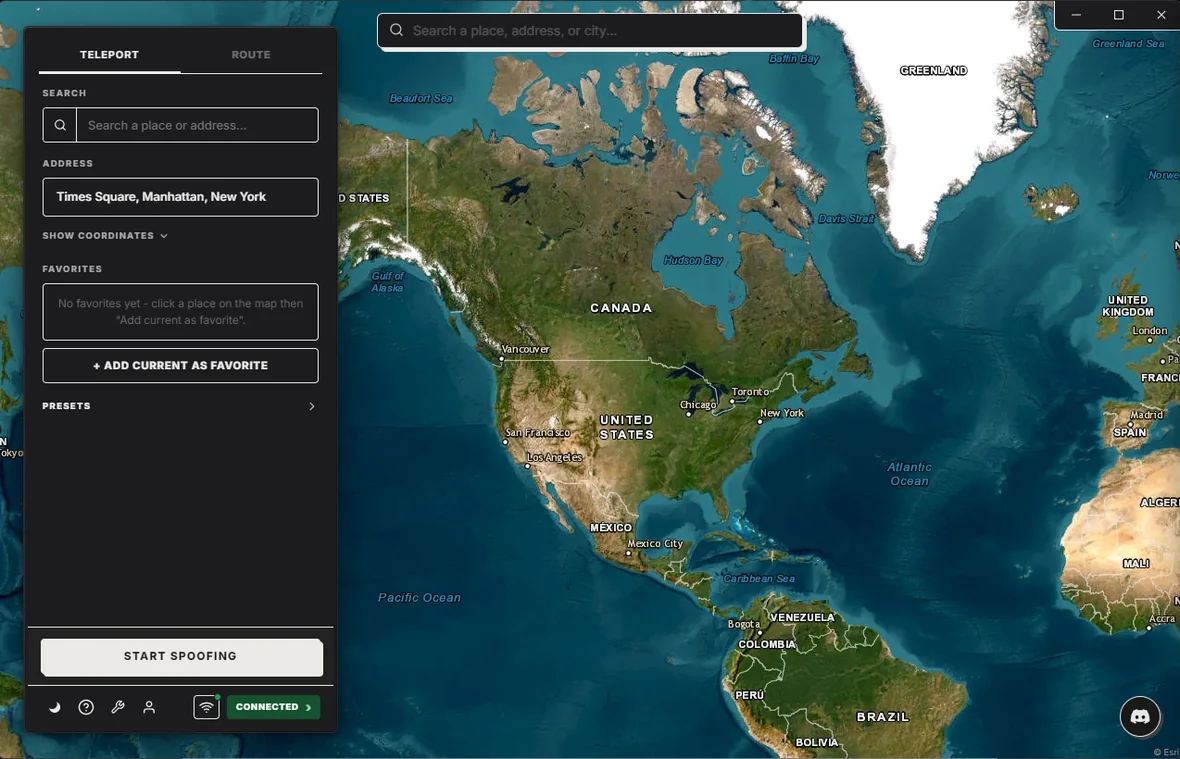
In desktop mode, your computer talks to your phone and hands it a fake spot. iOS treats that fake spot as the truth and reports it to every app on the device. Maps, Snap Map, Find My, Pokemon Go, dating apps, they all see the new place as real. Nothing on the phone is modified and this path installs nothing on it. Stop the spoof and the real GPS takes back over a second later. The computer has to stay powered and reachable the whole time, which is Apple’s design rather than ours.
In mobile mode, the PinDrift iPhone app does the same job from the phone itself. Every paid plan includes it, the desktop app installs it once over USB, and after that no computer is involved at all. It is an ordinary app on the phone and you can delete it like any other. iOS is never modified either way, and neither way needs a jailbreak.
Why jailbreak isn't the answer in 2026
Before Apple shipped the developer feature in iOS 17, you had two old options. You could jailbreak the phone and install a tweak, or you could install Xcode on a Mac and run the official Apple location simulator.
Both have aged badly. Modern iPhones (A14 and later) don't have public jailbreaks anymore, and Xcode is a 10 GB Mac-only download with a steep learning curve. The newer developer feature works on any iPhone running iOS 17 or newer, with no jailbreak, no Mac required, and no special Apple ID.
What PinDrift does on top
Apple's built-in feature can hand the phone one location. That's the whole thing. PinDrift wraps that with a world map you can click on, smart routes (walk, bike, drive at realistic speeds), Favorites, GPX import for replaying real recorded trips, and wireless mode so you can carry the phone around the house after the first cable pair.
There's also a tiny bit of realistic noise (called jitter) so the trace doesn't look suspiciously perfect. Real GPS wobbles a few meters even when you're standing still; PinDrift wobbles the same way.
Common questions
A few things people often assume, that aren't quite right:
- The phone moves with you. No. If you spoof Times Square and walk three blocks, the phone still reports Times Square. Use Route mode if you want the spot to move.
- It changes your IP address. No, only your location. Apps that fingerprint by IP (Netflix, banks) still see your real IP. PinDrift's always-on mode can route phone traffic through your home network if you need that too.
- You need a paid Apple developer account. No. The feature is called "Developer Mode" but is free and works with any Apple ID.
Pricing: $9/mo · $60/yr · $70 Lifetime · A True Free Trial · all future updates included, forever.
Frequently asked questions
Does the iPhone compass lie too?
The compass keeps reading the Earth's magnetic field, which is wherever you physically are. The fake GPS spot doesn't change that. For routes, iOS works out a heading from the simulated motion, so most apps with a "you are here" arrow follow along.
Can apps detect it?
Most can't. The fake spot looks the same as a real GPS reading to iOS. A few apps run extra fraud checks (some banking apps, some rideshare driver tools). PinDrift's jitter and route speeds help with the easy checks; nothing perfectly defeats every detection system.
Does it work without Wi-Fi?
The spoof itself doesn't need Wi-Fi on the phone. Once paired, you can spoof over a cable with the phone in airplane mode. You will need internet for any app that needs to push the location to the cloud (Find My, Snap Map, etc.).
What about cell-tower triangulation?
Your carrier knows which tower your phone is talking to. The spoof doesn't change that. An app reading carrier-side location could see a mismatch with the fake GPS, but most consumer apps don't read it at all.
Try PinDrift
A real free trial: no card, no account. $9 a month, $60 a year, or $70 once.
Download PinDrift $9/mo, $60/yr, or $70 once