iPhone location spoofer (2026)
Your kid won't believe you're at home. Apple won't let apps lie about your location, but they will let you set your iPhone to a fake one yourself. Here's how to do that in 2026 without a sketchy download.
Short answer
An iPhone location spoofer changes the GPS coordinates your iPhone reports to every app on it. PinDrift does it two ways. The desktop app, on Windows or macOS, drives the phone through the Developer Mode pathway Apple has shipped since iOS 16. Every paid plan also includes the PinDrift iPhone app, which your computer installs once and which then holds and moves the location on its own, with nothing connected. No App Store app can do this, because Apple does not allow them. No jailbreak either, and iOS itself is never modified. $9 a month, $60 a year or $70 once, with a genuine free trial.
Apple won't let apps lie about where you are, but they will let YOU set your iPhone to a fake location yourself. Here's the clean way.
What "location spoofer" actually means on iPhone
An iPhone location spoofer is a small program you run on your computer that tells your iPhone to pretend it's somewhere else. Every app on the phone, Maps, Snapchat, Find My, weather, dating apps, sees the fake spot as the real one.
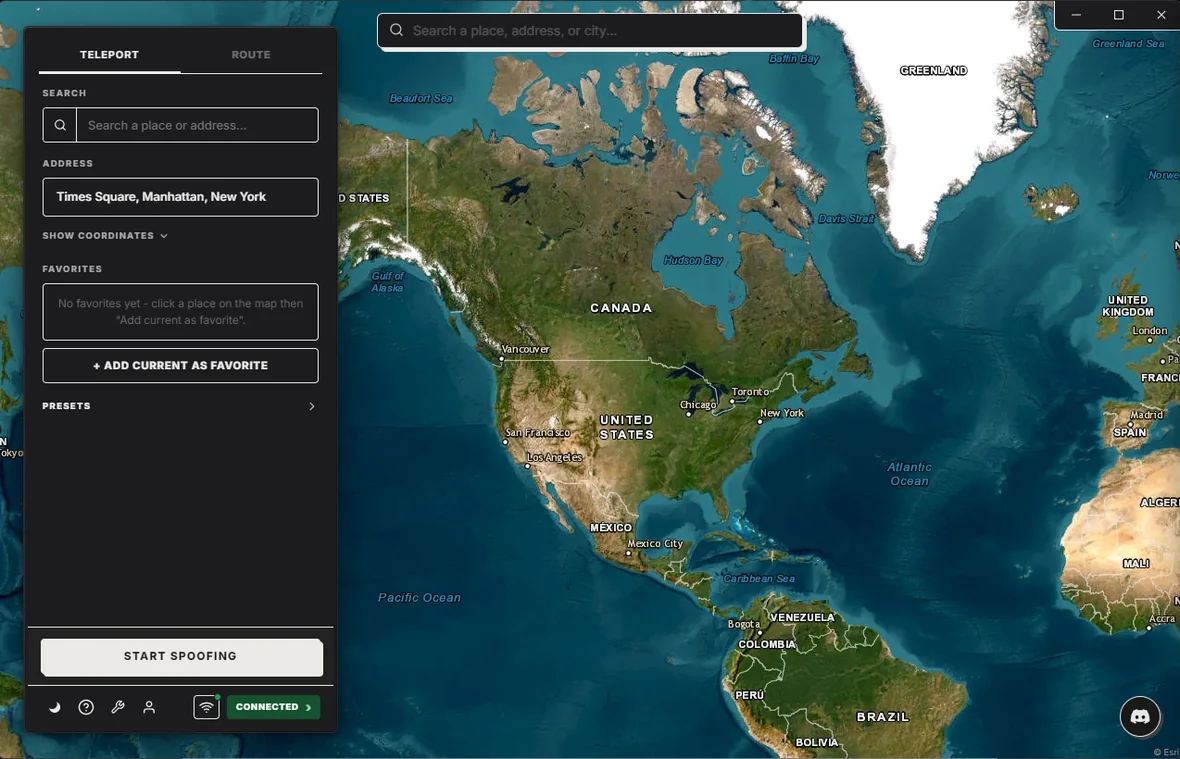
There is no "fake GPS" app for iPhone on the App Store, because Apple does not allow them. What Apple does ship is a developer feature that lets a paired computer hand the phone a location, and that is the pathway PinDrift uses at both ends. Turn the feature on, plug in the cable once, and pick a spot on a map from your computer. Install the PinDrift iPhone app while you are there, and the phone can then set and move its own location with nothing attached to it.
What PinDrift does
PinDrift is the app on your computer. It runs on Windows and macOS. You install it, plug in your iPhone, flip the developer toggle in Settings once, click anywhere on a map, and your phone is suddenly there.
That covers the basics. PinDrift also adds the parts Apple doesn't: routes (walk, bike, drive) at realistic speeds, wireless mode after the first pairing, and Favorites for the places you spoof most. The full app is free to try before you decide anything.
What you can spoof (and what you can't)
Pretty much every app that asks iOS where you are will see the fake spot. That includes Find My, Snap Map, Pokemon Go and other location games, Tinder and Bumble and Hinge, Life360, Strava, Apple Maps, Google Maps, weather and news apps, and iMessage location pins.
What it can't change: your Apple ID country, your App Store storefront, Apple Pay, and the carrier-side tower your phone is talking to. Those are tied to your account or your SIM, not your GPS.
If your bank app or Apple Pay checks more than just GPS (it usually does), the fake location won't fool it. Don't use a spoofer to dodge bank fraud checks. Stick to social, games, and dating use cases.
What it costs
$9/mo · $60/yr · $70 Lifetime · A True Free Trial · all future updates included, forever.
No bundled junk in the installer, no fake countdown timers, no credit card to start the trial. The clock starts on your first successful spoof, not when you install. Lifetime is actually lifetime, future iOS versions included.
Frequently asked questions
Is this legal?
In the US, setting your own iPhone to a fake location for personal use is generally legal. Using it to commit fraud, evade a court order, or break an app's terms of service is on you. PinDrift's Acceptable Use policy lists what we won't support. This isn't legal advice.
Does it need jailbreak?
No. PinDrift uses a built-in developer feature Apple ships with every iPhone running iOS 17 or newer. It's a toggle in Settings under Privacy and Security. No jailbreak, no root, no Mac required.
Will apps catch on?
Most apps just ask iOS where the phone is and trust the answer. Find My, Snap Map, dating apps, location-based games, weather apps, all see the fake location as real. A few apps run extra fraud checks, mostly some banking apps and rideshare driver tools. No spoofer can promise zero detection against a determined fraud team.
Does the spoof persist when I unplug?
It depends which way you are driving it. From the desktop app, no: the location holds only while the phone can reach the computer, by cable or over Wi-Fi, and it drops within a couple of seconds of losing it. That is Apple's design, not ours. With the PinDrift iPhone app, which is included with every paid plan, yes: once it is installed the phone holds and moves its own location with no computer involved at all. There is also a middle option, leaving the desktop app running on a machine you keep powered, which holds a spoof over your network 24/7.
Try PinDrift
A real free trial: no card, no account. $9 a month, $60 a year, or $70 once.
Download PinDrift $9/mo, $60/yr, or $70 once