Spoof several iPhone locations at once
A true multi-device iOS location spoofer drives several iPhones in parallel, not one at a time. PinDrift runs several from a single host computer, each on its own location. Here is what concurrent really means and where the limits are.
A multi-device iOS location spoofer drives more than one iPhone at the same time, each on its own location. PinDrift runs several iPhones at once from a single host computer, all moving in parallel rather than in a queue. It is included on both paid plans, Yearly and Lifetime, with no higher tier and no add-on.
Concurrent versus sequential device support
"Multi-device" can mean two very different things, and the difference matters.
Concurrent support means several phones each hold their own location at the same moment. Sequential support means the tool applies a location to one phone, then the next, then the next, so only one phone is actively spoofing at any given instant. That is a queue, even when the interface shows several rows.
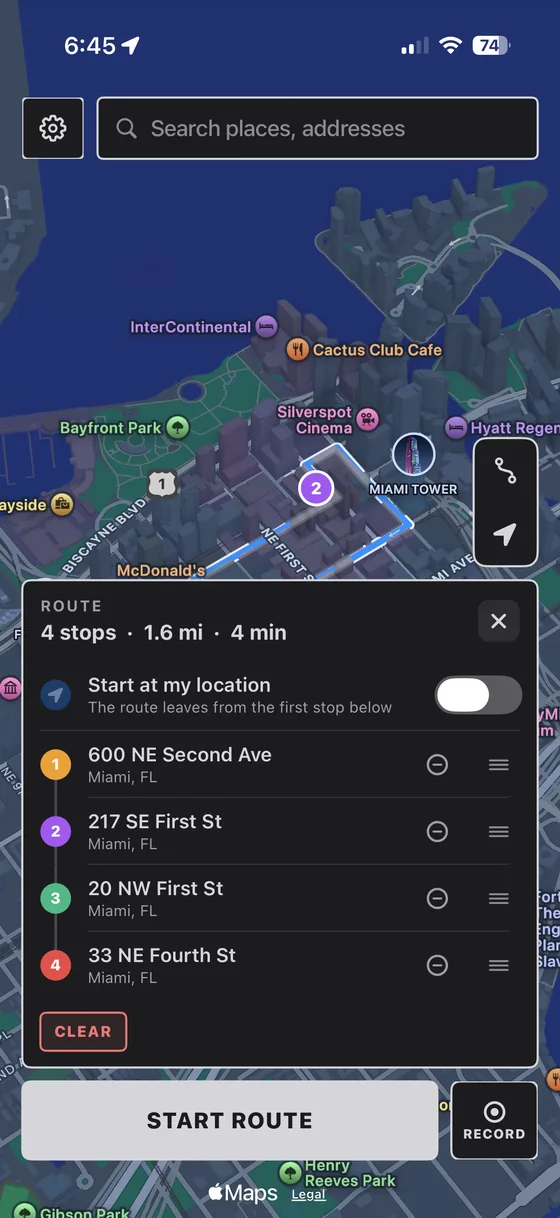
PinDrift is concurrent. Each phone runs its own location in parallel. One can be pinned to a Brooklyn coffee shop while another sits in a Chicago stadium and a third drives across San Diego at 24 mph, all at the same time, all independent of each other.
Set phone A to a moving route in one city. While it is moving, set phone B to a different city. If phone A freezes or jumps back to real GPS while phone B updates, the tool is running a queue. If phone A keeps driving while phone B spoofs, it is genuinely concurrent.
Host limit (one host computer)
One PinDrift license covers one active host computer at a time. That single host, a Windows or Mac machine, is what drives all of your phones. There is no setup where two computers share one license to run phones in parallel.
If you need to move PinDrift to a different machine, eligible license transfers are handled through the account portal, with a 180-day cooldown between device transfers. The one-host rule is why the phone limit below is per host and per license, rather than something you scale by adding computers.
Phone limit (the same on both paid plans)
PinDrift licenses a set number of phones spoofing at once on that one host. There is no higher tier, and no add-on lifts it.
Both current paid plans include the same allowance:
- Yearly, $60 per year (cancel anytime) includes the full concurrent allowance.
- Lifetime, $70 one-time includes the full concurrent allowance, with all future updates.
Multi-device is not a paywalled upsell here. If you are on a paid plan, you already have it. See the pricing page for the full breakdown. Inside a session, every phone is its own thing: its own pin or route, its own timing, its own connection, and its own restart. Unplug one and the rest keep going.
USB versus Wi-Fi considerations
Every phone pairs over USB once. After that you can keep it on the cable or switch it to wireless mode.
Over USB: The most direct and stable connection. The phones sit comfortably on a normal computer's USB ports, with no hub or extra hardware. Pair each phone over the cable first, tapping "Trust This Computer" on each one.
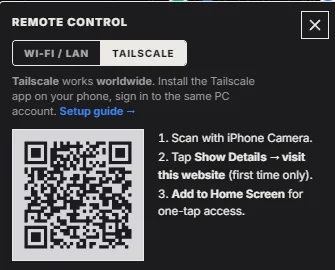
Over Wi-Fi (wireless mode): After the one-time USB pairing, a phone can talk to the host over the network with no cable. Wireless mode scales more gracefully: a phone that drops off the network rejoins on its own without re-pairing. The phones and host must be on the same Wi-Fi, unless you add Tailscale (a separate third-party product) so phones on different networks can reach the host. You can mix freely: some phones on cables, some on Wi-Fi, in the same session.
Tested hardware
A dependable multi-phone setup does not need exotic gear. This is the combination we validate against:
- Host: any Windows 10 (22H2) or Windows 11 machine, or a macOS 13 (Ventura) or newer Mac. A mini-PC or Mac mini makes a tidy dedicated host.
- Phones: iPhones on iOS 17 or newer. Compatibility is verified on iOS 17.5, 18.1, and 18.4. iPads on iPadOS 17 or newer count the same as iPhones.
Check your specific devices on the compatibility page before building out a fleet.
Realistic limits
Here is the honest picture, not a sales pitch:
- No extra hardware needed. The phones connect over your computer's normal USB ports. There is no hub or dock to buy.
- Connecting them all at once has a small startup cost. It can take a few seconds for them to show ready. PinDrift shows per-phone progress while they come up.
- Connected phones add a little overhead. Other apps' networking can feel slightly slower with several phones connected; disconnect the ones you are not using.
- Not every app is guaranteed to be fooled. Most apps trust the location iOS reports, but a few run extra fraud checks (some banking apps, some rideshare driver tools) that GPS alone will not satisfy.
QA use cases
Concurrent multi-device control is most useful for legitimate testing where you need several locations live at once:
- Geofencing and geo-content QA: confirm region-gated features, pricing, or content behave correctly across several cities simultaneously.
- Location-sharing and family-safety apps: exercise multiple accounts in different places at the same time to test alerts and geo-triggers.
- Location-based games and events: validate multi-account behavior and event coverage across separate locations.
- Delivery and rideshare flows in a dev environment: place several test devices in distinct service areas to check routing and matching logic.
Keep movement believable across the fleet with speed control, covered in the anti-speed guide, and review what a GPS spoof does and does not conceal on the location privacy page.
Technical scaling documentation
For the full engineering detail, including how concurrent control works, how wireless mode differs from USB, and how to fix a phone that does not show up, read the multi-device scaling documentation.
Frequently asked questions
How many iPhones can PinDrift spoof at once?
Several, all at the same time, each on its own location. The limit is per host computer and it is included on both paid plans. There is no higher tier and no add-on that lifts it.
Is this really concurrent, or a queue?
Concurrent. Every phone runs its own pin or route with its own timing. One phone driving a route does not pause another phone. You can watch all of them move at the same time.
Can I use more than one host computer to get past the limit?
A single PinDrift license covers one active host computer at a time, and the multi-device limit is enforced per license, so there is no supported way to combine hosts under one license to get past it.
Do I need a powered USB hub?
No. The phones connect over your computer's normal USB ports. No powered hub, dock, or extra hardware is needed.
Do the phones have to be on the same Wi-Fi?
Over the data cable, no. In wireless mode they do, unless you add Tailscale, a separate third-party product, so phones on different networks can reach the host.
Do iPads count toward the limit?
Yes. Any iPad running iPadOS 17 or newer counts the same as an iPhone, and you can mix iPhones and iPads inside the same session.
Is that a license limit or a hardware limit?
It is a license cap, included on both paid plans. It sits well within what a normal computer's USB ports handle, so hardware is not the limit.
Try PinDrift
A real free trial: no card, no account. $9 a month, $60 a year, or $70 once.
Download PinDrift $9/mo, $60/yr, or $70 onceKeep reading
- Multi-device scalingThe real limits, how wireless differs, and why 3 is the cap.
- Always-on, no laptopKeep the fleet running without your main computer.
- Anti-speed and realistic movementKeep simulated travel within believable limits.
- Location privacyWhat a GPS spoof does and does not hide.
- CompatibilityWhich iPhones, iOS versions, and hosts are supported.