iPhone location changer (2026)
Most tools sold as an "iPhone location changer" only change your IP address. Here is the difference, and the one method that actually moves the GPS coordinate every app on your phone reads.
Short answer
A VPN changes your IP address, not your location. Changing the GPS coordinate your iPhone reports to Find My, Snapchat, Life360, Tinder and every other app goes through Apple's own Developer Mode pathway, and PinDrift sets that up from Windows or macOS in about five minutes. From there you have a choice. Keep driving the location from the computer, which adds nothing to the phone at all. Or install the PinDrift iPhone app, included with every paid plan, and control the simulated location from the phone itself without the computer staying connected. No jailbreak either way, and fully reversible. $9 a month, $60 a year or $70 once, with a free trial.
Why most "location changers" do not change your location
Search for an iPhone location changer and you will mostly find VPNs. A VPN routes your traffic through a server somewhere else, so a website that guesses where you are from your IP address guesses wrong. That is genuinely useful for streaming catalogues and region-locked web content.
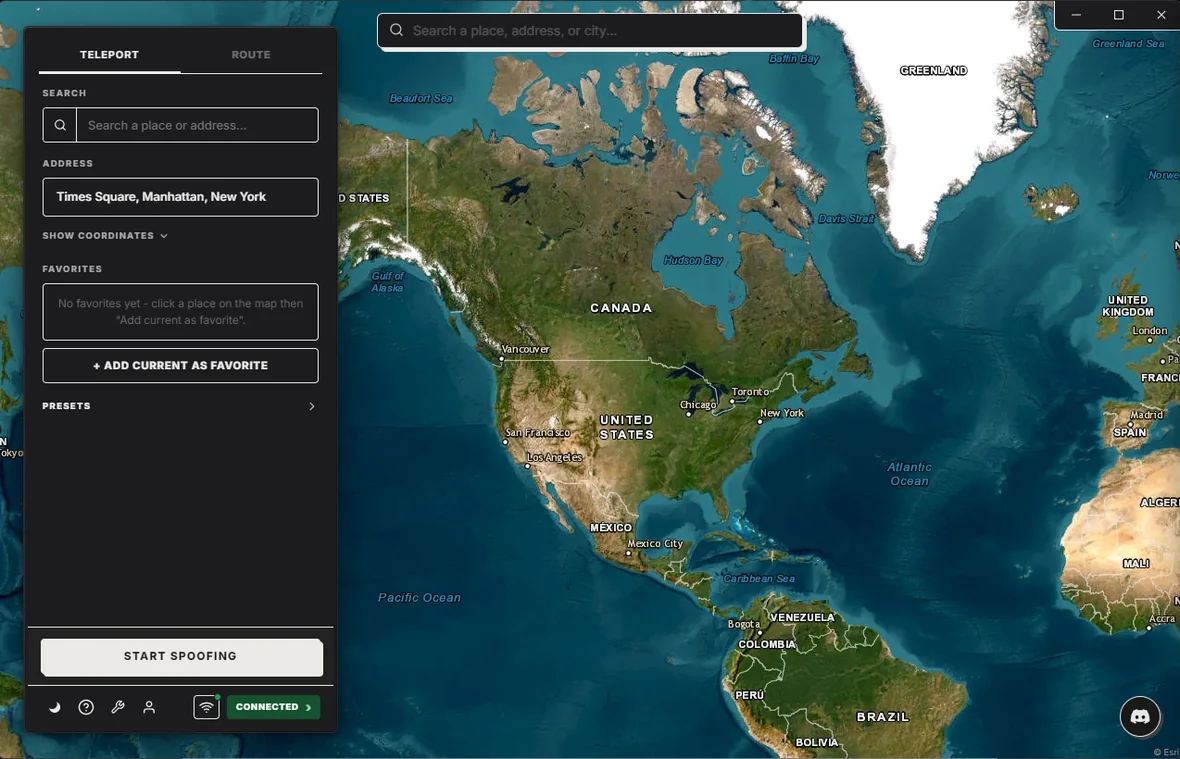
It is also completely invisible to the apps people actually want to move. Find My does not look at your IP. Neither does Snap Map, Life360, Apple Maps, Strava, or any dating app. They ask iOS a direct question through Core Location: where is this phone? iOS answers with a coordinate derived from GPS, Wi-Fi and cell triangulation. A VPN never touches that pipeline, so the answer stays your real address no matter which country your traffic exits from.
If a tool promises to change your iPhone location and only asks you to pick a server from a list, it is a VPN, and it will not do what you want.
The three methods, honestly compared
| Method | Moves GPS? | Needs jailbreak? | Good for |
|---|---|---|---|
| VPN | No, IP only | No | Region-locked websites and streaming |
| Jailbreak tweak | Yes | Yes | Nothing, in 2026. Modern iOS versions are not reliably jailbreakable and it voids your warranty |
| Developer Mode pathway (desktop app, or PinDrift's iPhone app) |
Yes | No | Everything: Find My, Snap Map, Life360, dating apps, games, route simulation |
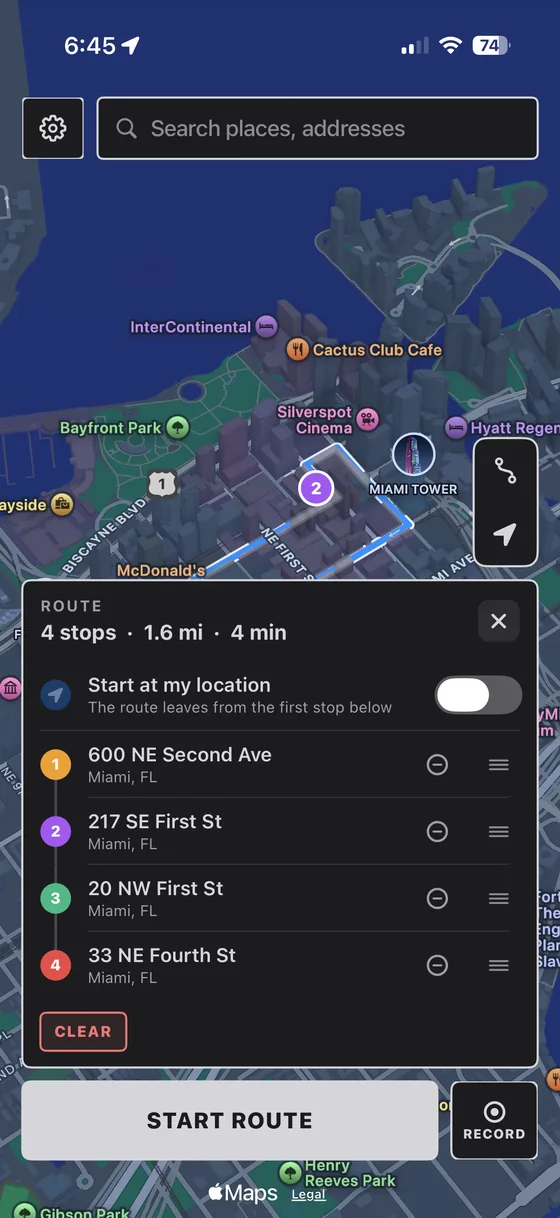
The third row is the only approach that works on a current, stock iPhone. Apple added Developer Mode in iOS 16 as a safety toggle for developers testing apps. Flip it on and a paired computer can hand the phone a simulated coordinate through the same channel Xcode uses to test a location-aware app. iOS treats that coordinate as the truth and serves it to every app that asks. PinDrift drives that channel two ways: from the desktop app, or from its own iPhone app, which a computer installs once and is then finished with. Neither one jailbreaks anything, and neither asks the phone to be anything other than stock.
Apple does not allow apps that override Core Location, so nothing on the App Store can change your GPS on its own. Anything listed there calling itself a location changer is a VPN, a photo metadata editor, or a companion app for a desktop tool. The coordinates have to come through Developer Mode, which a computer sets up once.
How to change your iPhone location, step by step
- Install the desktop app. PinDrift runs on Windows 10 22H2 or newer and macOS 13 Ventura or newer. No account is needed to download it.
- Turn on Developer Mode. On the iPhone: Settings, then Privacy & Security, then Developer Mode. Toggle it on and the phone restarts once. If you do not see the entry, connect the phone to the computer first and it appears.
- Pair over USB once. Plug in the cable and tap Trust on the phone. This first pairing is the only time you need a cable.
- Click a spot on the map. Your iPhone reports those coordinates within a second or two. Open Maps on the phone and you will see the blue dot sitting wherever you clicked.
- Draw a route if you want to move. A location that never moves reads as suspicious to anything tracking you. Draw a path and pick a walking, cycling or driving speed and the coordinate travels it realistically.
After the first pairing you can go wireless on the same network, and unplug the cable entirely. See USB and Wi-Fi setup for the details, or always-on mode if you want the location held 24/7 without leaving your main computer running.
What changes, and what does not
Changes: Find My, Snapchat's Snap Map, Life360, Apple Maps, Google Maps, Tinder, Bumble, Hinge, Strava, weather and news apps, location-based games, and iMessage location pins. All of these ask iOS for the coordinate and trust the answer.
Does not change: your Apple ID country, your App Store storefront, Apple Pay, and the cell tower your SIM is registered to. Those are tied to your account or your carrier, not to GPS. A handful of apps also run independent fraud checks that compare GPS against IP, network and behavioural signals, mainly some banking apps and rideshare driver tools. No location changer can promise to defeat a dedicated fraud team, and we do not claim otherwise.
Is changing your iPhone location legal?
In the United States, setting a phone you own to a location you choose, for your own personal use, is generally legal. Location privacy is a legitimate reason to do it, and app and game testing is another. What is not legal, and not something we will support, is using it to commit fraud, to evade a court order or custody arrangement, or to track or deceive another person. Our Acceptable Use policy is specific about this. None of this is legal advice.
What it costs
$9 a month, $60 a year, or $70 once for a lifetime licence. A genuine free trial with the full feature set, no card and no signup, with the clock starting on your first successful location change rather than on install. All future updates are included on Yearly and Lifetime, and there is no bundled software in the installer. Full breakdown on the pricing page.
Frequently asked questions
Can a VPN change my iPhone location?
No, not the location that matters. A VPN changes the IP address your iPhone connects from, which changes what a website guesses about you. It does not touch Core Location, so Find My, Snap Map, Life360, Apple Maps, dating apps and location games all still read your real GPS coordinates. To move those you have to change the GPS itself.
Is there an iPhone location changer app on the App Store?
No. Apple does not permit apps that override Core Location, so no App Store app can change your iPhone's GPS. Anything advertising itself there as a location changer is either a VPN, a photo metadata editor, or a companion app for a desktop tool. The coordinates have to come through Apple's own Developer Mode pathway, which a paired computer sets up. After that setup the PinDrift iPhone app, included with every paid plan, can drive it from the phone itself.
Does changing my iPhone location require a jailbreak?
No. Since iOS 16 Apple has shipped Developer Mode, a toggle in Settings under Privacy & Security. With it on, a paired computer can hand the phone a simulated location through the same channel Xcode uses. The phone stays completely stock, this desktop-driven path installs nothing on it, and turning Developer Mode back off reverses everything. See the no-jailbreak walkthrough.
Does the changed location stick after I unplug?
In desktop mode it holds as long as the phone can still reach the host computer. After the one-time USB pairing that link can be wireless, so the cable comes out and the location stays, and it clears when the host session ends, for example if you quit the app or the tunnel is torn down. In mobile mode the question does not arise: every paid plan includes the PinDrift iPhone app, and once the desktop app has installed it the phone holds and moves the location on its own with the computer unplugged and switched off. For 24/7 operation without the app, leave the host running on a machine you keep on, which is what always-on mode is for.
Which apps see the changed location?
Any app that asks iOS where the phone is, which is nearly all of them: Find My, Snap Map, Life360, Apple Maps, Google Maps, Tinder, Bumble, Hinge, Strava, weather apps and location-based games. Apps that run independent fraud checks, mainly some banking and rideshare driver apps, may compare GPS against other signals and are not reliable targets.
How much does an iPhone location changer cost?
PinDrift is $9 a month, $60 a year, or $70 once for a lifetime licence, with a genuine free trial of the full feature set, no card and no signup. All future updates are included on Yearly and Lifetime.
Try PinDrift
A real free trial: no card, no account. $9 a month, $60 a year, or $70 once.
Download PinDrift $9/mo, $60/yr, or $70 onceKeep reading
- iPhone location spooferThe same job, described in the other common term.
- Change iPhone location without jailbreakThe Developer Mode path, end to end.
- Find My location spooferWhat your family circle actually sees.
- Life360 location spooferIncluding why a frozen pin gives you away.
- Hiding from your Life360 circleWhich methods raise a flag, and which do not.
- Best iOS location spooferHonest comparison, including where we lose.