Pause your Life360 location without them knowing
Life360 does not send a push notification when you pause. It does something more obvious: it writes "Location Sharing Paused" under your name and leaves your avatar frozen where you were.
Short answer
Pausing does not trigger a push notification, which is why so many pages call it undetectable. It is not. Life360 labels you "Location Sharing Paused" directly under your name in the circle list, and your avatar stays pinned at the last precise place you were before you paused. Anyone who opens the app sees both. If the goal is to not be noticed, pausing is the wrong tool, because the absence of a location is itself the signal. The alternative is to keep reporting a location that simply is not the one you are standing in.
What actually happens when you pause
Life360's pause feature does exactly what it says: it stops your phone sending location updates to the circle. What it does not do is make you invisible.
Three things change the moment you tap it, and all three are visible to anyone who opens the app:
- A label appears under your name. The circle list shows "Location Sharing Paused" beneath you. It is plain text, not a subtle icon.
- Your avatar freezes. It stays on the map at the last precise location recorded before you paused. It does not disappear, and it does not go vague. It sits exactly where you were.
- Your timestamp goes stale. The "last updated" time stops advancing while everyone else's keeps ticking.
"No notification" is not the same as "nobody notices"
This is the gap most advice on this topic glosses over. It is true that Life360 does not fire a push notification saying you paused. It is also true that the app is built to make gaps in sharing obvious, because that is the product. A tracker that silently tolerated people switching it off would not be worth paying for.
So the practical question is not "will my phone buzz theirs". It is "what does the map look like next time they open it". A frozen pin with a paused label next to it is a louder signal than a moving pin, not a quieter one.
The same logic applies to the other common workarounds. Turning off location permissions shows a permissions warning. Force-quitting the app shows you as offline. Airplane mode shows the same stale pin. Every route that stops the data flowing leaves a hole where the data used to be, and the hole is what gets noticed.
The options, side by side
| Method | Push sent? | What the circle sees |
|---|---|---|
| Pause location | No | "Location Sharing Paused" label, frozen avatar at your last real spot |
| Turn off permissions | No | A permissions warning against your name |
| Force-quit / airplane mode | No | Offline or greyed out, stale timestamp |
| Bubbles | No | An explicit bubble around you, so they know you chose to blur it |
| Log out or leave circle | Yes | Removal is announced to the circle |
| Report a different location | No | A normal, moving, up-to-date pin |
Only the last row leaves the map looking like nothing happened, because from Life360's point of view nothing did. The phone keeps reporting, on schedule, with a fresh timestamp. It is just reporting coordinates you chose.
How to report a different location instead
iOS will not let an App Store app override your GPS, so there is no App Store app that can do this. The location comes through the Developer Mode pathway Apple has shipped since iOS 16, driven either by a paired computer or by the PinDrift iPhone app, which that computer installs once. No jailbreak, no change to iOS itself, fully reversible.
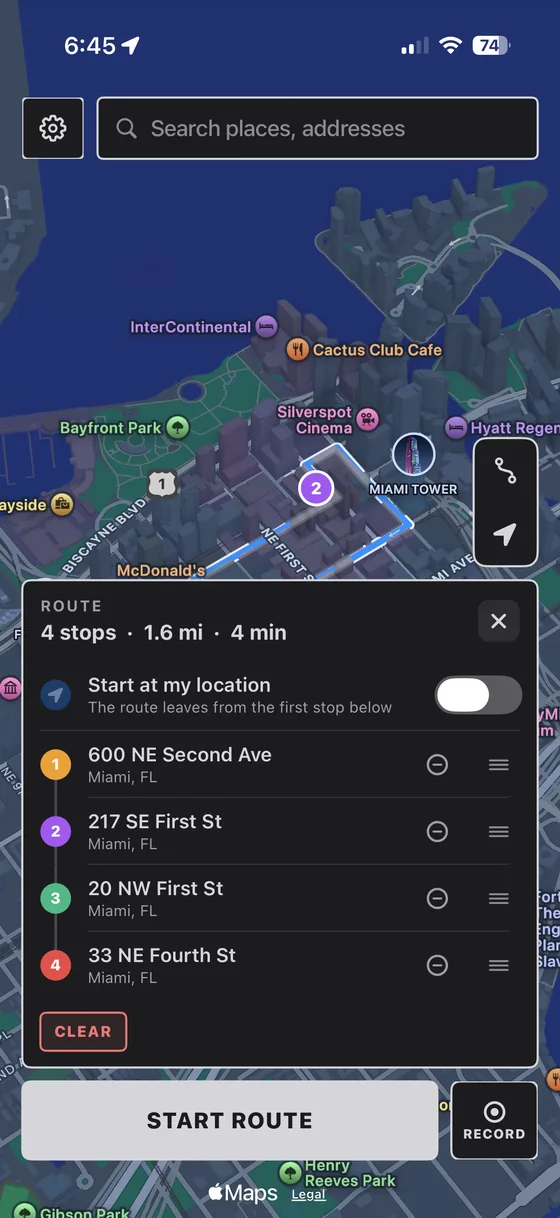
- Install PinDrift on Windows or macOS. No account needed to download it.
- Turn on Developer Mode on the iPhone: Settings, then Privacy & Security, then Developer Mode. The phone restarts once.
- Pair over USB once and tap Trust. After that first pairing you can work wirelessly on your own network.
- Drop a pin somewhere plausible. Life360 reads the new coordinates on its next update like any other position.
- Draw a route if you will be "there" for a while. A pin that never moves for six hours reads as odd in its own way. See the full walkthrough for what a believable pattern looks like.
Swapping a paused pin for a stationary fake one solves half the problem. Real phones drift a few metres, move between rooms, and travel. If you are going to be somewhere for hours, use a route at walking speed rather than a single fixed point.
Where we draw the line
Setting a phone you own to a location you choose is generally legal in the United States, and location privacy is a legitimate reason to want it. Adults have a reasonable interest in not broadcasting their movements continuously, including to family.
What we do not support is using this to evade a court order or custody arrangement, to deceive an employer who requires location as a condition of work, or against a device you do not own. Our Acceptable Use policy is specific. None of this is legal advice, and if you are a minor in a circle your parents set up, talk to them rather than to a spoofer.
Frequently asked questions
Does Life360 notify people when you pause your location?
No push notification is sent. But the app displays "Location Sharing Paused" under your name in the circle list, and your avatar stays frozen at the last precise location it recorded. Anyone who opens Life360 and looks at the map can see both, so pausing is visible even though it is not announced.
What do circle members see when I pause?
Your avatar remains on the map at the exact spot you were when you paused, with a "Location Sharing Paused" label beneath your name and a last-updated timestamp that stops advancing. It does not remove you from the map or blur your position.
Is there a way to pause Life360 with nothing showing at all?
Not through pausing. Every method that stops your phone sending data leaves a visible gap: a paused label, a permissions warning, an offline state, or a stale timestamp. The only approach that leaves the map looking normal is to keep sending location data while choosing what those coordinates are.
Does turning off my phone hide me on Life360?
It stops updates, but the effect on the map is the same as pausing: your avatar sits at its last known position with an increasingly old timestamp, and you may show as offline. It hides where you are going, not the fact that you stopped sharing.
Can I change my Life360 location without a computer?
After a one-time setup, yes. Apple does not let App Store apps override Core Location, so a computer is needed once: to pair the phone and install the PinDrift iPhone app with your own Apple ID. After that the iPhone app holds and moves the location by itself.
Will Life360 know my location is simulated?
Life360 asks iOS where the phone is and uses the answer. A simulated location supplied through Apple’s own developer pathway is delivered the same way a real one is. What gives people away is behaviour rather than detection: a pin that never moves, or one that jumps hundreds of miles instantly.
Try PinDrift
30 free minutes a day on the PinDrift iPhone app, no card, no account. $9 a month, $60 a year, or $70 once.
Download PinDrift $9/mo, $60/yr, or $70 onceKeep reading
- Hide your Life360 location without them knowingThe full walkthrough, including what a believable location looks like.
- Life360 location spooferHow PinDrift handles Life360 specifically.
- Life360 Ghost Mode, explainedWhy the feature everyone searches for does not exist.
- Find My location spooferThe same problem on Apple's own tracker.
- iPhone location changerWhat a VPN can and cannot do.